
Your own TMDB key
MediaClaw works without one. Show details come from TheTVDB, and the movie calendar and Top Movies from DVDsReleaseDates, all built in. A key from TMDB (The Movie Database) is an optional extra you bring yourself:
- Movie posters and ratings before a download finishes, instead of once Plex has the file.
- A backup source for show details when TheTVDB doesn’t have a show, or has it wrong.
The key is free for personal, non-commercial use. It takes a few minutes.
1. Make a TMDB account
- Go to themoviedb.org/signup and create an account.
- Open the email TMDB sends you and verify your address.
Use a computer for the next step: TMDB says its key form isn’t made for phones.
2. Ask for an API key
- Sign in, then open themoviedb.org/settings/api. That’s Settings → API in your account menu.
- Ask for a key. If TMDB asks what it’s for, say it’s for personal, non-commercial use.
- Accept TMDB’s API terms of use.
- Fill in the application form. TMDB asks for your contact details and a few words about the app. For the app, something like this is fine:
- Application name: MediaClaw
- Application URL:
https://mediaclaw.shop - Summary: Personal use: posters and details for my own Plex library.
TMDB then shows your keys on the same API page.
3. Copy the right key
The API page shows two values. MediaClaw needs the short one:
| Use this | Not this |
|---|---|
| API Key: a short string of letters and numbers, about 32 characters | API Read Access Token: a very long string starting with eyJ |
If MediaClaw doesn’t take your key, check that you didn’t copy the Read Access Token.
4. Add it to MediaClaw
- In MediaClaw, open Settings and find the TMDB metadata card.
- Paste the key into API key.
- Click Save artwork key.
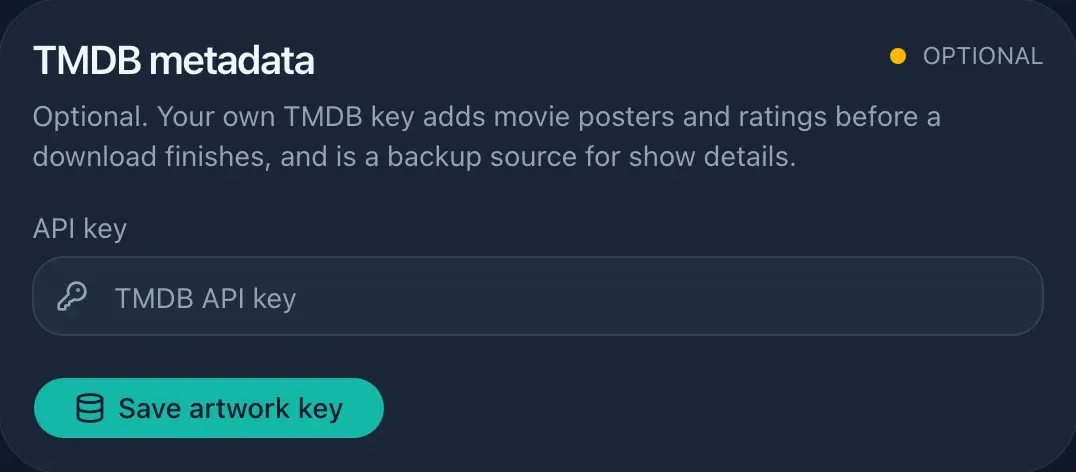
The TMDB metadata card in Settings.
The card’s dot turns green and says Configured. Posters and ratings fill in over the next few minutes as MediaClaw checks your movies.
To take the key out again, click Remove key on the same card. MediaClaw goes back to its built-in sources; nothing in your library changes.
Good to know
- Your key stays on your Mac. MediaClaw talks to TMDB directly with it; the key isn’t sent to us.
- Credit to TMDB. With a key added, MediaClaw shows TMDB’s notice in its footer, as TMDB’s terms ask.
- Personal use only. TMDB’s free keys are for non-commercial use. Your key is yours: don’t share it.